Building a personal site without a CMS from Markdown notes
I have rebuilt tomitaku.net. It brings together a personal encyclopedia of words that caught my interest and the posts from my old blog, in one site.
There is no CMS. Every page starts as a Markdown file, publishing is a Git push, and most of the implementation and writing is done by AI (Claude Code). This post sets out how the site is put together, and the thinking behind it.
Overview
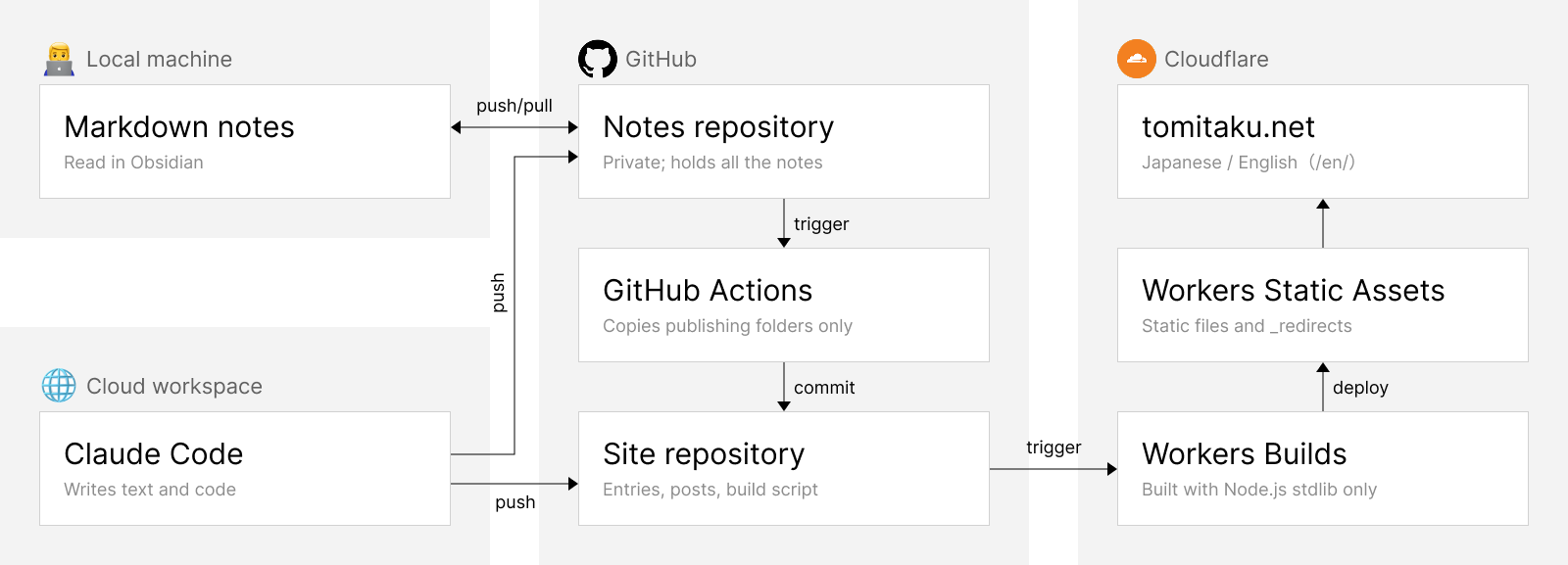
- Source: encyclopedia entries live in a private notes repository, blog posts in the site repository, all as Markdown
- Publishing scope: GitHub Actions copies only the entries in the publishing folders into the site repository
- Build: a build script made for this site alone, written with nothing but the Node.js standard library
- Hosting: built by Cloudflare Workers Builds and served from Workers Static Assets
What is served is static files only; there is no Worker script and no database. The redirects use Cloudflare's standard mechanism: a _redirects file written at build time, which Cloudflare reads to return 301s. The few things that move on the page, such as filtering the index, are JavaScript in the browser.
The source is Markdown
The encyclopedia entries are written as Markdown notes. Claude Code does most of the writing, not on my machine but in a cloud workspace, where it clones the repository, writes and pushes. I pull the notes to my machine, read them in Obsidian, and fix what bothers me myself. I use Obsidian only as a viewer; the data itself is plain text files. Blog posts are the exception: their source sits directly in the site repository, not in the notes.
The notes also hold work memos and personal records, so the notes and the site live in separate repositories. When a push changes one of the publishing folders in the notes repository (two of them, Japanese and English), GitHub Actions runs and commits only the entries in those folders to the site repository. The site's build never touches the private notes, so even a mistake in the build configuration cannot expose notes outside the publishing folders.
Build and hosting
The build script is about 400 lines, written for this site alone using only the Node.js standard library. The Markdown conversion does not use a general-purpose library either; it is a simple one that handles only the syntax I actually use: headings, lists, links, images, quotes, code, footnotes and so on. The build uses no npm packages (deployment uses wrangler, Cloudflare's CLI). A personal site inevitably goes untouched for years at a time. Meanwhile, dependency updates and security fixes pile up, and the next update starts with repairing the build environment. I wanted to avoid that.
Besides the entry pages and the index, the build generates, for each entry, a list of the entries that mention its name; related entries found by cosine similarity over character bigram TF-IDF; pages for words that do not have an entry yet; the redirect settings (_redirects); and the English version (/en/) with hreflang annotations.
A push to the main branch of the site repository makes Workers Builds build and deploy the site. The old blog posts were exported through the WordPress REST API and converted to Markdown. They keep their WordPress post numbers, and the old URLs, /blog/archives/<number>, redirect to the new ones with a 301.
AI in place of an admin screen
There is no admin screen. Adding an entry and fixing a post are the same operation: edit a text file and push.
Most of that work is done by Claude Code. I do not write code myself, so the build script, the GitHub Actions workflow and the migration from WordPress were all written by Claude Code. My part is to put into words what kind of site I want, to look at what comes out, and to make the calls.
The encyclopedia entries, too, are researched and written together with Claude. The writing procedure is kept as a Claude Code skill (a file describing how to do the work). It says, among other things, that the sources consulted must be listed, that anything that could not be confirmed is left under "To verify", and that an English translation is made at the same time.
A front page with no timeline
The front page of a typical blog is a list of the newest posts. This site's front page has no list and no search box. It shows a single paragraph that passes through several entries in turn, and when you finish reading, links to the entries it passed through appear below.
The design draws on the idea of the digital garden. In a 2015 talk, Mike Caulfield contrasted the web where information flows by in time order, like social media and blogs, which he called the "stream", with the web where information is linked together and tended again and again, like a wiki, which he called the "garden". A digital garden is an attempt to build a personal site in the spirit of the latter.
In a list sorted by date, older entries sink out of sight. When the connections between entries are the way in, an entry written long ago has the same chance of being read as a new one. The chronological list has moved to the index page.
The paragraphs on the front page are written by Claude after reading the entries, and edited by me. They are not generated on each visit. That would cost money and time, and it would put text that nobody has checked on the face of the site.
Why keep a personal encyclopedia as text
The entries are words that interested me personally: circular diversion works, PEBCAK, dazzle camouflage. If you only want to know what they mean, Wikipedia is enough. But a record of what I chose, and of what I connected to what, shows the outline of my interests.
What matters is that the record is a set of text files. When Claude Code runs on top of these notes and is told to use them, it searches and reads them as needed while it answers. It is an external memory of my own that works much like RAG: without explaining my tastes, interests and way of seeing things every time, I can have conversations that start from them.
The public site is only a part of that knowledge base, made readable from outside. I do not intend to promote it, but as the encyclopedia grows, the site will grow with it, little by little.